
1. Update to Job Invoicing Timing:
- What this means: We’ve made a global change so that Taskers can now only invoice for a job after the scheduled appointment start time has passed.
- Why we did it: This update ensures that invoicing aligns more accurately with when work actually begins. It helps keep job timelines transparent for both Taskers and clients, improving trust and consistency across the platform.
- What you’ll see: If you try to invoice before the scheduled appointment start time, the option will be unavailable until the appointment start time has passed.
2. Update to Skill Settings Placement:
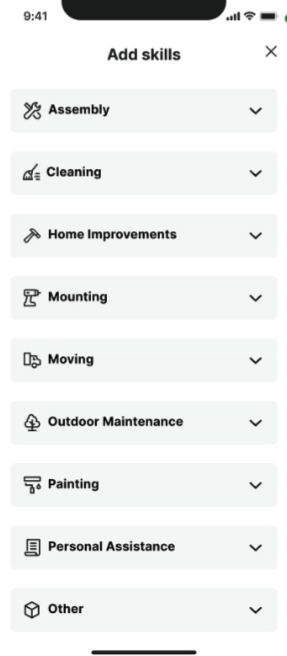
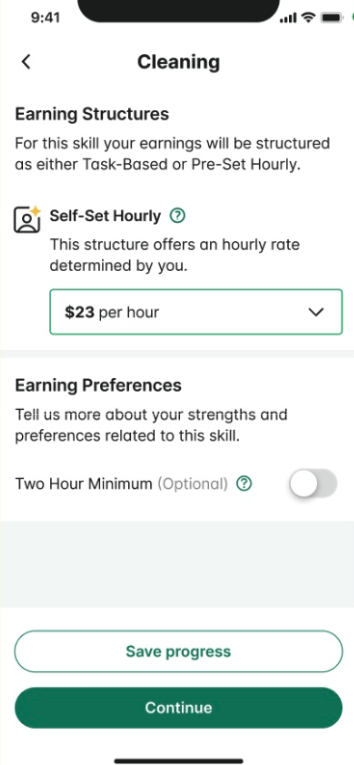
- What this means: We’ve updated where certain skill settings live. Your 2-hour minimum and Business Photos settings will now be managed directly within each category’s edit screen – right where you activate or edit that specific skill.
- Why we did it: This change makes category management more intuitive and organized. By keeping all category-specific settings in one place, it’s easier to review and update your preferences without digging through multiple menus
- What you’ll see:
- Previously, these settings were located under: Profile → Tasker profile
- Now, when you open a category to edit or activate it, you’ll see the 2-hour minimum and Business Photos options within that category’s settings.
Tasker Tip
Add a clear, professional headshot to your Tasker profile. Clients are more likely to send task invitations to Taskers who have clear, well-lit profile photos.
Last updated on December 16, 2025 by Isabel Gottlieb